What is Windows 11 Memory Integrity and how does it affect your PC?
Microsoft is preparing an important change for Windows 11 security: starting in October 2026, regular updates of the operating system will begin to automatically enable the Memory Integrity feature on more compatible devices. This measure is part of Microsoft’s strategy to enhance the security level of Windows without requiring users to manually configure protection features.
According to Microsoft, activation will be done gradually and will not target all PCs at the same time. The system will first check whether the device meets the necessary criteria regarding hardware, driver compatibility, performance, and Windows 11 requirements. On some PCs, the process may also enable Virtualization-based Security (VBS), the technology on which Memory Integrity relies.
What is Memory Integrity in Windows 11?
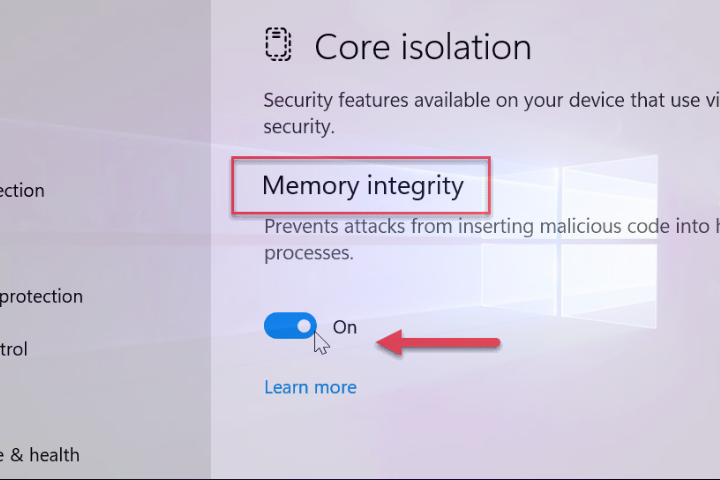
Memory Integrity, also known as Hypervisor-protected Code Integrity (HVCI), is a security feature designed to protect critical components of Windows, especially the operating system kernel.
In short, Memory Integrity uses hardware virtualization to isolate code integrity verification mechanisms. The aim is to prevent malicious code or unsafe drivers from gaining unauthorized access to the kernel level.
This protection is important because attacks that reach the kernel level can have serious consequences: an attacker may try to bypass security mechanisms, manipulate system components, or gain elevated privileges.
Microsoft states that Memory Integrity allows only the execution of trusted kernel-mode code and drivers.
Why is Memory Integrity enabled automatically?
The main reason is security. Many users do not modify the advanced settings of Windows Security, even if certain protection features are available.
By automatically enabling it on eligible devices, Microsoft can extend kernel protection to systems that previously had Memory Integrity disabled without the user explicitly requesting this.
Importantly, Microsoft does not intend to enable the feature without checks. Before implementation, Windows evaluates factors such as hardware capabilities, compatibility, performance, and the security configuration of the device.
How does Memory Integrity affect overall system performance?
Enabling Memory Integrity can have some impact on system performance, including gaming performance and some applications that heavily demand PC resources, as the feature uses Virtualization-Based Security (VBS) to protect critical components of Windows. This mechanism adds an additional level of verification and security, which can create some load on system resources.
On modern computers, the impact is generally low and may be difficult to notice during regular use. In contrast, on older systems or PCs that are already heavily loaded, performance differences may become more noticeable.
The impact may also vary depending on the activity performed on the PC, from demanding applications and CPU-intensive tasks to gaming. Therefore, enabling Memory Integrity does not automatically mean that the system will become slower; the effect depends on the hardware and software configuration of each device.
For most users, the additional level of security provided by Memory Integrity is more important than any minor impact on performance. If the PC operates normally after the feature is enabled, it is recommended to keep it activated.
What happens with drivers incompatible with this feature?
One of the possible effects of enabling Memory Integrity relates to incompatible drivers.
Kernel-mode drivers have a very high level of access to the system. An old or vulnerable driver can thus become a weak link in the security chain. If a device has drivers incompatible with HVCI, Windows may prevent their loading or require their update before protection works correctly.
Therefore, users who use older hardware, overclocking utilities, monitoring software, or applications that install low-level drivers should check compatibility before manually modifying security settings.
Should you disable Memory Integrity?
If Memory Integrity is automatically enabled by Windows 11 and the system operates normally, the logical recommendation is to keep it enabled. The feature provides an additional level of protection against attacks that try to compromise the kernel or exploit vulnerable drivers.
Microsoft also states an important aspect: existing user or administrator choices and already configured policies will be respected. In other words, a PC where Memory Integrity has been deliberately disabled should not have this choice automatically overridden by the new implementation mechanism.
Where to check Memory Integrity in Windows 11?
You can check the status of the feature in: Windows Security → Device security → Core isolation details → Memory integrity
Microsoft documents the same path for manually enabling the feature. If the option is enabled and you do not notice compatibility or performance issues, there is no general reason to disable it.
An important change for Windows 11 security
The automatic enabling of Memory Integrity in Windows 11 starting October 2026 represents an extension of security protection at the kernel level. Microsoft will implement the change through Windows updates, and the implementation will be gradual and dependent on device compatibility.
For the average user, the best approach is simple: keep the feature enabled if the system operates smoothly. If there are incompatibilities with drivers or applications, the issue should be investigated and resolved through software updates, not by permanently disabling an important protection.
In the case of older gaming PCs, however, it is worth monitoring the impact on performance after the October update. If significant FPS drops or compatibility issues arise, they should be analyzed individually.
Source: techcommunity.microsoft.com