


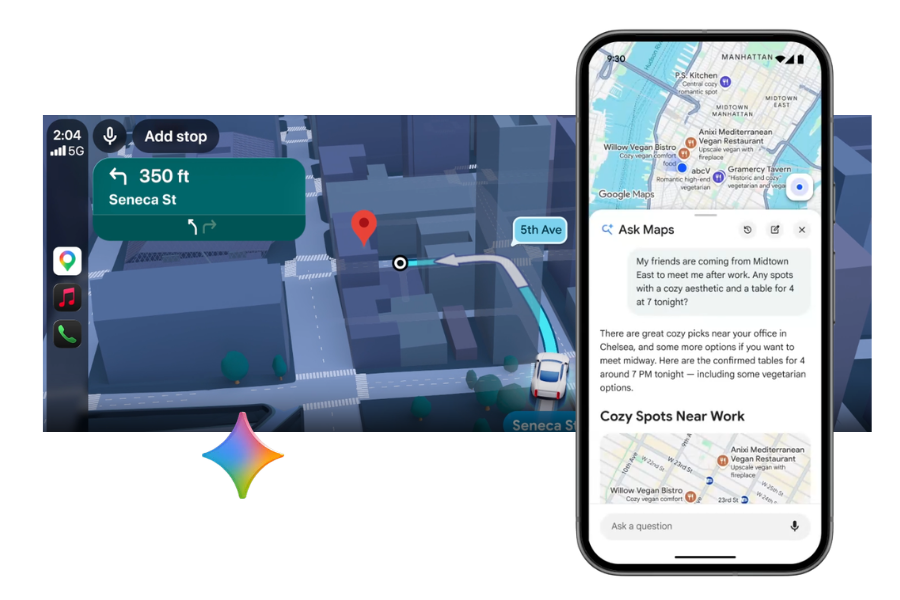
Ask Maps and Immersive Navigation: 2 AI features for Google Maps
Google Maps continues to evolve rapidly, and the latest updates bring a major transformation in how users discover places and navigate. By integrating AI models from the Google Gemini family, the platform introduces two innovative features: Ask Maps and Immersive Navigation. These promise to make navigation more intuitive, visual, and personalized than ever.
In this article, you will learn what these features are, how they work, and why they represent one of the most important updates in recent years for Google Maps.
What is Ask Maps and how does it work?
Ask Maps is an AI-based feature that allows users to interact with Google Maps in a conversational way. Instead of just entering keywords, you can ask complex questions, and the app provides you with relevant recommendations.
For example, you can ask:
- “How can I spend the evening with friends in this city?”
- “Where can I find a net cafe with a power outlet for my laptop?”
The AI analyzes information from millions of reviews, photos, and location data to provide personalized suggestions. Additionally, the feature can quickly summarize user opinions about a place, so you can understand faster what makes it special.
Another important advantage is that recommendations become increasingly relevant over time, as the system learns from the user’s preferences and activity within the app.
Immersive Navigation: a new visual navigation experience
In addition to conversational features, Google also introduces Immersive Navigation, a much more realistic navigation experience. It uses images, 3D models, and artificial intelligence to recreate routes in a detailed and intuitive way.
Instead of a simple 2D map, users can see:
- buildings and terrain in 3D format
- road signs and infrastructure elements
- simulated traffic or weather conditions for the planned travel time
The technology behind this feature combines billions of images collected from satellites, planes, and Street View cars. These are processed using advanced photogrammetry and machine learning techniques to build three-dimensional models of the urban environment.
The result is a visual experience that helps you better understand the route before you hit the road.
Smarter navigation to your destination
The updates also bring improvements for the final guidance to your destination. For example, Google Maps can now:
- highlight the exact entrance to a building
- indicate nearby parking
- provide walking directions after you park
The app can also signal interruptions or issues along the route, such as flooded roads or low visibility.
These features are especially useful in crowded cities or unfamiliar places, where navigation can be challenging.
Features like Ask Maps and Immersive Navigation transform the Google Maps app into a smart assistant
The integration of AI into Google Maps marks a major shift: the app is no longer just a navigation tool, but becomes a smart exploration and planning assistant.
With features like Ask Maps, users can discover activities, restaurants, or tourist attractions in a much more natural way, using everyday language. At the same time, Immersive Navigation reduces traffic stress through clearer visualizations of the route.
As these features are expanded globally, it is very likely that the way we use digital maps will change radically, and navigation will become simpler and more intuitive than ever.
Source: blog.google


