Why do companies and organizations prefer compact PCs?
In a business environment where space, efficiency, and cost control are important, compact PCs represent a practical alternative to traditional desktop systems. Mini PCs and Small Form Factor (SFF) systems can provide the necessary performance for numerous professional activities while occupying much less space.
For a company using dozens or even hundreds of workstations, the difference can become significant. A compact PC contributes to a more efficient organization of the workspace, reduces clutter on the desk, and can simplify equipment management.
What are compact PCs?
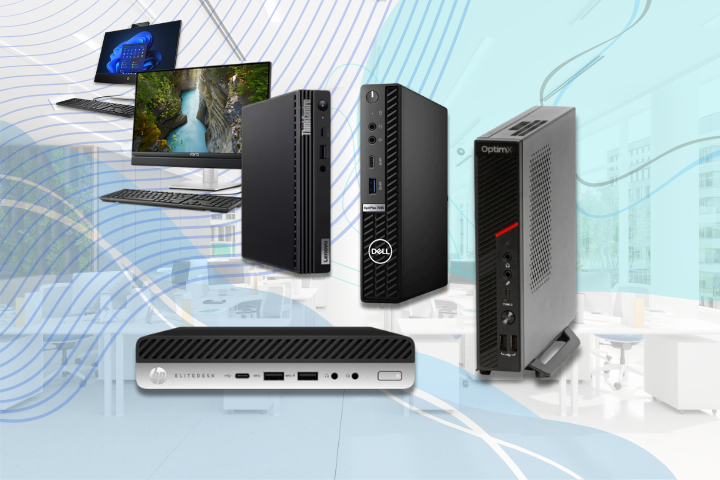
Compact PCs are desktop systems designed to take up as little space as possible. The most common options are Mini PCs and Small Form Factor (SFF) systems.
A Mini PC can be small enough to be placed on the desk, under it, or even behind the monitor when the equipment allows this type of mounting. SFF systems are somewhat bulkier, but they can offer more space for components and upgrades.
It is important to note that a smaller PC size does not automatically mean lower performance. For a PC intended for a company, the hardware configuration, processor, RAM, SSD, connectivity, and compatibility with the applications used should be analyzed.
Why are companies increasingly choosing compact PCs?
1. Compact PCs take up less space
One of the most important advantages of a compact PC is its small footprint.
In a workspace where 20, 50, or 100 computers are installed, the size of the units can have a real impact on the organization of the office. A Mini PC can be placed in a discreet location or mounted behind the monitor, freeing up workspace.
This feature is especially useful for:
- open-space offices;
- receptions;
- offices;
- call centers;
- stores and work points;
- training rooms;
- commercial spaces;
- offices with limited space.
A more spacious workstation can facilitate cable organization and contribute to a more orderly work environment.
2. Compact PCs are sufficient for numerous business activities
A PC intended for a company does not necessarily have to be a high-power system.
For an employee working with email, Office applications, a browser, accounting programs, CRM, ERP, management, or communication platforms, the performance requirements are different from those of a user who does 3D rendering or video editing.
A properly configured Mini PC, equipped with an adequate processor, sufficient RAM, and SSD, can provide the necessary performance for numerous work scenarios.
Therefore, the company should choose the hardware configuration based on the actual requirements of the activity, not automatically opt for the most powerful workstation available.
3. Helps organize workstations
A traditional desktop involves the central unit, power and data cables, video connections, and various peripherals. In a space with many workstations, all of these can contribute to desk clutter.
A compact system can significantly reduce this problem.
When the Mini PC is mounted behind the monitor, most of the equipment no longer occupies desk space. For companies looking for a uniform and well-organized appearance of workstations, this can be an important advantage.
4. Compact PCs facilitate standardization of IT equipment
For IT departments, standardizing workstations can simplify infrastructure management.
A company can use the same configuration or the same family of PCs for employees performing similar activities. Thus, installing applications, configuring systems, maintenance, and equipment replacement can become easier to manage.
For example, for office activities, a standard configuration may include:
- processor from a suitable class for multitasking;
- 16 GB RAM;
- 512 GB SSD;
- Ethernet connection;
- Wi-Fi, if necessary;
- sufficient USB ports;
- video outputs for one or more monitors;
- operating system compatible with the company’s infrastructure.
The exact configuration should be adapted to the existing applications and workflows.
Mini PC or SFF for a company?
The choice between Mini PC and SFF depends on the workstation requirements.
A Mini PC is suitable when a small size is a priority, and the activity mainly involves using office applications, a browser, management programs, CRM, or ERP.
The SFF format can be a suitable solution when the company wants a compact computer but needs more flexibility regarding upgrades or internal components.
A classic desktop remains relevant for activities that require dedicated graphics cards, multiple internal components, large storage capacities, or frequent hardware upgrades.
Therefore, the correct question is not “which format is better?”, but “which format best meets the workstation requirements?”
New or refurbished compact PCs?
For a company that needs to equip multiple workstations, the purchase budget can be an important criterion.
In addition to new systems, it is worth considering the option of refurbished business computers. Systems from professional ranges can represent a solution for office activities when they are checked, tested, and sold under proper conditions.
This option can be particularly interesting when the company needs to purchase a large number of computers and seeks a balanced cost-performance ratio.
When choosing a refurbished PC, it is not enough to check just the processor model. It is important to analyze the complete configuration, RAM, SSD capacity, connectivity, equipment condition, and warranty terms.
What configuration is suitable for a business PC?
There is no universal configuration for all companies and all workstations. For a computer used in office activities, the following elements may be important:
Processor: must provide the necessary performance for the applications used and the level of multitasking.
RAM: 16 GB is a suitable starting point for numerous modern office scenarios, but the requirement may be higher for specialized applications.
Storage: an SSD is preferable to an HDD for the operating system and daily used applications, due to shorter access times and faster system response.
Connectivity: USB ports, video outputs, Ethernet, Wi-Fi, and other necessary connections should be checked.
Monitors: if the employee works with two or more screens, it is important to check the system’s ability to support that configuration beforehand.
Flexibility: the ability to improve the configuration over time allows the company to modify the system configuration as work requirements grow.
In a company purchase, the configuration should be established based on the actual applications and activities of the users.
Energy consumption
Energy consumption depends on the components and configuration of each system. Therefore, it should not be automatically assumed that any Mini PC consumes less than any desktop.
However, many compact systems are designed with energy consumption adapted to the dimensions and type of use for which they were designed.
For a company using dozens of computers for several hours a day, consumption can become a relevant criterion when analyzing the total cost of use.
Thus, instead of considering only the purchase price, a broader perspective may be useful:
initial cost + energy consumption + maintenance + lifespan + upgrade potential.
This approach can provide a more realistic picture of the hardware investment.
When is a Mini PC not recommended?
The compact size may come with certain compromises. A Mini PC may not be the right choice for activities such as:
- intensive 3D rendering;
- professional video editing;
- demanding CAD design;
- applications that require a high-performance dedicated graphics card;
- activities that require frequent hardware component upgrades;
- simultaneous use of numerous internal components.
For such scenarios, a workstation or classic desktop may offer more flexibility.
Additionally, before purchase, it is essential to check exactly what the system allows regarding RAM, SSD, connectivity, cooling, and expansions.
Checklist for choosing a compact PC for the company
Before purchasing a compact computer, it is useful to answer a few questions:
- What applications will the employee use?
- How much RAM is needed for daily activities?
- What storage capacity is necessary for the activity performed?
- How many monitors need to be connected?
- Is a wired network connection necessary, or can a wireless connection be used?
- Is there a possibility to improve the system configuration in the future?
- Is the operating system compatible with the company’s infrastructure?
- What is the estimated lifespan of the computer?
- Is a new system necessary, or is a refurbished business PC sufficient?
- What type of system fits better with the usage requirements: Mini PC or SFF?
The answers to these questions can help the company avoid both the purchase of an oversized system and the selection of a computer that does not provide enough performance.
Performance and efficient use of space
Compact PCs represent a practical solution for organizations that want to combine the necessary performance for daily activities with more efficient use of space.
For office activities, accounting, management, communication, CRM, ERP, and web browsing, a properly configured Mini PC can represent a sufficiently powerful workstation. When more upgrade options, additional components, or high graphics performance are needed, an SFF system, desktop, or workstation may be more suitable.
When choosing a computer for the company, the main criterion should not be the size of the case but the match between the hardware configuration and the user’s activity.
For companies evaluating multiple options, new compact systems and refurbished business PCs can be compared based on performance, cost, connectivity, upgrade possibilities, and estimated lifespan. A well-founded choice can mean not only a more organized desk but also a hardware investment tailored to the real needs of the company.