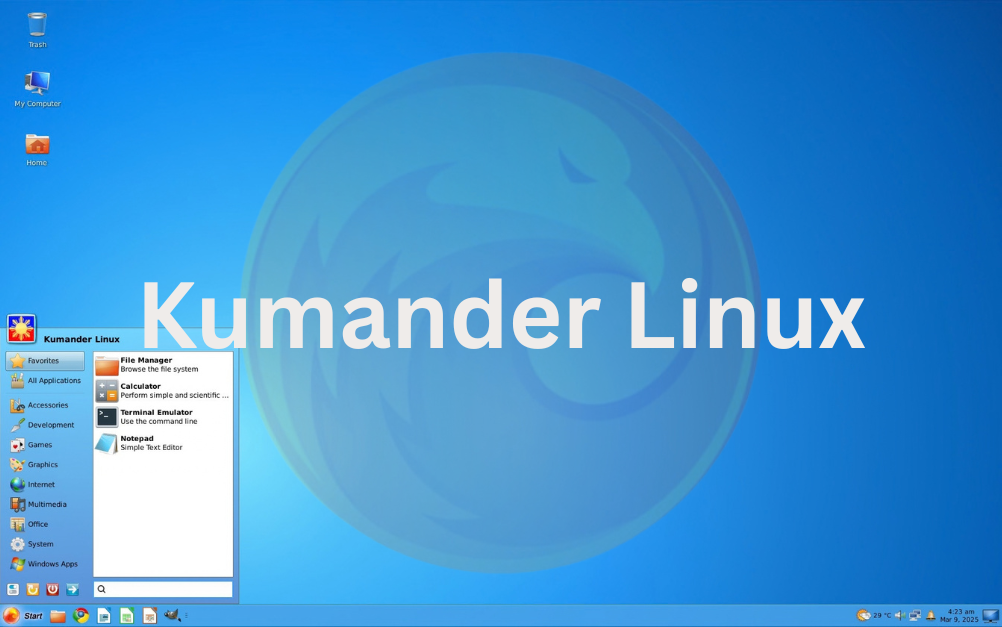
Are you a Windows 7 nostalgic? Try Kumander Linux
For many PC users, Windows 7 remains one of the most appreciated versions of Windows. The Aero interface, the Start menu, familiar icons, and the simple organization of the desktop created an experience that modern versions of the Microsoft operating system no longer reproduce in the same way. This is where Kumander Linux comes in, a Linux distribution based on Debian and built around the XFCE desktop environment.
The project aims to provide users coming from Windows with a smooth transition, maintaining a familiar interface while also offering the advantages of the Linux ecosystem.
What is Kumander Linux?
Kumander Linux is a GNU/Linux distribution based on Debian, with XFCE desktop, visually inspired by and user experience similar to Windows 7. It is important to note: the developers explicitly state that it is not a clone of Windows 7, but a Linux system with its own identity, its own tools, and open-source technologies.
The similarity is intentional, especially at the interface and workflow level. Users encounter a traditional desktop, a familiar application menu, and an organization that may be easier to understand for someone used to Windows.
The Debian base is another important element. It allows the use of .deb packages and Debian repositories, and the project also offers support for Flatpak.
Behind the Kumander Linux project is Roy Hoejgaard, the lead developer, who lives in the Philippines. The project is built around an independent approach and is supported by a community of Linux users and enthusiasts.
The name Kumander has a story related to the project’s beginnings and the developer’s passion for Commodore computers. In Filipino, “Kumander” means “Commander” and was chosen as a tribute to Commodore computers.
About the similarity to Windows 7?
The main goal of the project is to reduce the entry barrier for users who want to switch from Windows to Linux without having to learn a new way of working from scratch.
The interface is inspired by the aesthetics of Windows 7, including the use of visual elements reminiscent of the Aero period. The developers have modified and customized XFCE to create a more familiar experience for Windows users.
This approach may be particularly interesting for those who:
- have used Windows 7 for many years;
- are not comfortable with modern Windows interfaces;
- have an older computer and are looking for a lighter operating system;
- want to experiment with Linux without a radical interface change;
- prefer a traditional desktop with an application menu and taskbar.
Kumander Linux does not attempt to turn Linux into Windows. Rather, the project uses the familiarity of Windows 7 as a starting point for new users.
System requirements and hardware compatibility
The project uses the XFCE desktop environment, known for its relatively low resource consumption compared to some more complex desktop environments. The official site describes Kumander Linux as a “lightweight” distribution, an operating system aimed at users looking for low system requirements.
The official minimum requirements are a single-core 1 GHz 64-bit processor, 2 GB of RAM, and at least 8 GB of storage space. For a smooth experience, the developers recommend at least a dual-core 1 GHz 64-bit processor, 4 GB of RAM, and 20 GB of space on an SSD or HDD.
A practical advantage is that the ISO image can be booted in Live Mode, allowing the user to test the distribution before installation.
What programs are included in Kumander Linux?
Kumander Linux aims to be usable immediately after installation, not just to provide a blank desktop. The distribution includes or promotes a range of well-known applications:
- Google Chrome – the default browser;
- LibreOffice – office suite for documents, spreadsheets, and presentations;
- Kdenlive – video editor;
- Ardour – audio production application;
- Steam – for gaming;
- VirtualBox – for running virtual machines;
- support for Flatpak and applications available through the software center.
Previous versions also integrated other applications and tools, including VLC, Blender, Inkscape, DOSBox, and various emulators for retro platforms.
For an average user, the idea is simple: immediately after installation, the system should be usable for internet browsing, documents, multimedia, programming, content creation, and even gaming.
Can Kumander Linux run Windows applications?
Yes, but an important distinction must be made. Linux cannot natively run all Windows applications. Kumander Linux uses the Wine emulator for compatibility with certain Windows applications.
In Kumander Linux 2.0, the developers made this feature easier to use by adding a “Windows Apps” section in the Start menu. Essentially, the user can find here the Windows programs installed through Wine and launch them from the application menu, similarly to regular Linux programs.
Compatibility depends on each application. Some programs may work very well, others may require additional configurations, and certain programs may not work at all.
This is an important aspect for users considering the switch from Windows to Linux: Kumander Linux can reduce dependence on Windows, but it does not guarantee compatibility with every Windows program.
Kumander Linux and gaming
Regarding gaming, Linux has made significant progress in recent years, and Kumander Linux includes integration with the Steam platform. The official site of the distribution mentions support for Steam and the ability to run games on Linux, but compatibility must be checked for each game individually.
An important role is played by Proton, the technology developed by Valve that allows many games created for Windows to run on Linux through Steam. However, Proton is not a guarantee that any game will work perfectly. Compatibility can vary depending on the game, the version of Proton, graphic drivers, and other software components.
To check the status of a specific game before installation, users can consult ProtonDB, a database based on reports and experiences from the Linux community. By searching for the game’s name on ProtonDB, you can see if other users have managed to run it on Linux and what issues they encountered. It is a useful resource especially before purchasing a game on Steam with the intention of playing it on Linux.
What’s new in Kumander Linux 3.0 “Goldfinch”?
In 2026, the project entered a new phase with the Kumander Linux 3.0 “Goldfinch” series.
On August 1, 2026, the developers released Release Candidate 2, with an ISO image of approximately 4.3 GB. This version is based on Debian 13 and has brought several important changes.
Among the new features are:
- fixing compatibility issues when booting in UEFI mode;
- support for Windows BitLocker;
- improvements for GTK4 application integration;
- fixes for Software Center;
- a new internally developed application store;
- Git Desktop, a Git client developed by the project;
- Code Editor, a code editor with integrated terminal and artificial intelligence features;
- updated themes and visual elements.
It is important to note that a Release Candidate version is not the same as a stable final version. If you intend to use the system on your main computer, it is recommended to first check what the currently available stable version is.
How to install Kumander Linux?
The process is similar to installing other Linux distributions. The ISO image can be downloaded from the official Kumander Linux website. The download page also offers SHA-256 verification and instructions for creating a bootable USB stick. For Windows users, the project recommends Rufus, and for Linux, the application Balena Etcher is mentioned.
A recommended approach is:
- download the ISO image from the official website;
- verify the integrity of the image using the SHA-256 sum;
- create a bootable USB stick (the minimum recommended capacity is at least 8GB);
- boot the computer in Live mode;
- test the Wi-Fi, sound, video card, touchpad, and other peripherals;
- back up important data;
- only then install the system on SSD or HDD.
For users who have never installed Linux before, this method allows testing hardware compatibility before modifying the existing system.
Who is this Linux distribution aimed at?
Kumander Linux is particularly interesting for users looking for an alternative to Windows with a familiar interface. The distribution can also be relevant for PCs that no longer provide a satisfactory experience with modern versions of Windows, provided the hardware meets the system requirements.
At the same time, users should keep in mind that switching to Linux entails certain differences. Not all Windows programs are available, some peripherals may require configuration, and certain games and commercial applications may have compatibility issues.
Is Kumander Linux a “Windows 7” for 2026?
Kumander Linux is not Windows 7, but it is one of the Linux distributions that explicitly tries to maintain the familiarity of that experience.
The Debian base, XFCE desktop, application integration, support for Flatpak, Wine, Steam, and the ability to test the system in Live mode make it an interesting project for users who want to transition from Windows to Linux without completely giving up a traditional desktop.
Especially the evolution towards Kumander Linux 3.0 “Goldfinch” shows that the project is not limited to nostalgia. The developers are adding their own tools and updating the technical base of the distribution, including the transition to Debian 13.
For Windows 7 nostalgics, Kumander Linux thus offers an interesting combination: familiar look, modern Linux technologies, and the freedom to use a Debian-based operating system.
If you want to test it, the safest starting point is the official download page, where you can check the available version and ISO image before installation.
Official site: kumander.org