How to continue conversations with other AI chatbots in Gemini
In an ever-evolving digital world, artificial intelligence is becoming increasingly personalized and integrated into daily activities. One of the latest innovations comes from Google, which facilitates the transition for users to the Gemini app. Here’s how you can switch an AI assistant with the Gemini app without losing conversation history or preferences.
What is the Gemini app and why is it worth using
Gemini is the AI assistant developed by Google, designed to provide intelligent, personalized, and contextual responses. Unlike previous generations of chatbots, Gemini is built to better understand the user, integrating information from previous conversations and personal preferences.
The main issue when switching an AI assistant is that you have to “start from scratch.” Google has identified this obstacle and launched an innovative solution that simplifies the migration process.
The major novelty: importing memory and conversation history
Google has introduced an extremely useful feature: the ability to import memory and conversation history from other AI applications directly into Gemini.
This feature allows the transfer of your preferences (response style, interests, habits) and the continuation of previous conversations seamlessly, without having to reconfigure everything. Essentially, the app “learns” who you are from day one.
How the migration process to Gemini works
The process is simple and accessible even for users without technical experience. Here are the main steps:
1. Importing memory
You need to use a prompt suggested by Gemini in the AI application you were using previously. This will generate a summary of your preferences, which you will copy into Gemini.
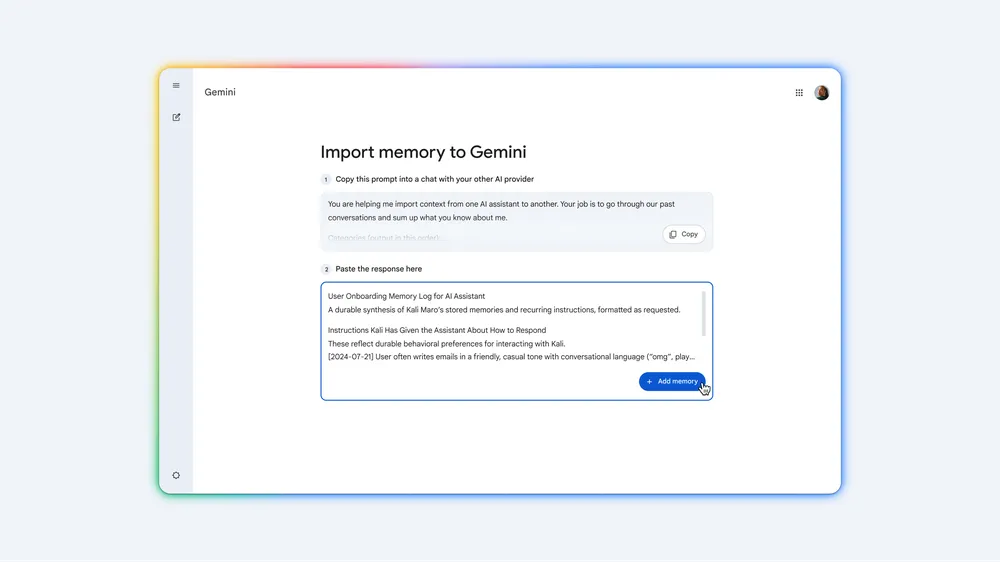
2. Importing conversation history
You can download conversations from the previous application in the form of an archive (.zip) and upload them to Gemini. This way, you have access to old discussions and can continue them.
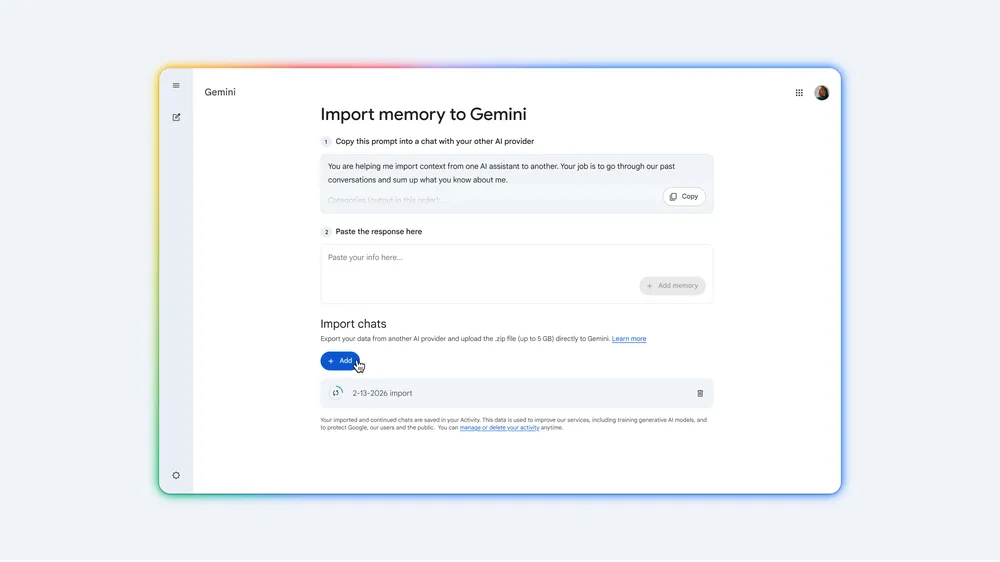
3. Data management
After the import, you have complete control over your data. You can delete certain conversations or the entire history whenever you wish.
Advantages of using Gemini after migration
Instant personalization
Unlike other platforms, you no longer have to “train” the AI from scratch. Gemini quickly understands your style and provides relevant responses.
Continuity in use
You can resume conversations exactly where you left off, without loss of context.
Smoother experience
The integration with the Google ecosystem makes Gemini useful in daily activities such as searches, emails, or personal organization.
Control over data
You have clear options for managing and deleting imported information, which provides transparency and security.
Why this change is important in the AI ecosystem
This update marks an important step in the evolution of artificial intelligence. Until now, users were limited to a single platform due to accumulated data and preferences. Now, mobility becomes a reality.
Google proposes a truly personal AI assistant that not only answers questions but also understands your history and needs. Transitioning to the Gemini app has never been easier.
Thanks to the memory and conversation history import features, users can make the switch without fear of losing important information. Moreover, this flexibility paves the way for a future where users can freely choose AI platforms without compromises.
Source: blog.google