Chrome + Gemini 3 changes the way we browse the internet
In 2026, Google makes a major step towards AI-assisted browsers, integrating powerful functionalities based on its artificial intelligence model Gemini 3 directly into the Chrome browser. This update transforms the traditional way of browsing the internet, bringing a persistent AI assistant capable of performing complex tasks for users. This AI assistant is not limited to answering users’ questions or synthesizing web pages, but automatically navigates websites and can complete workflows on behalf of the user.
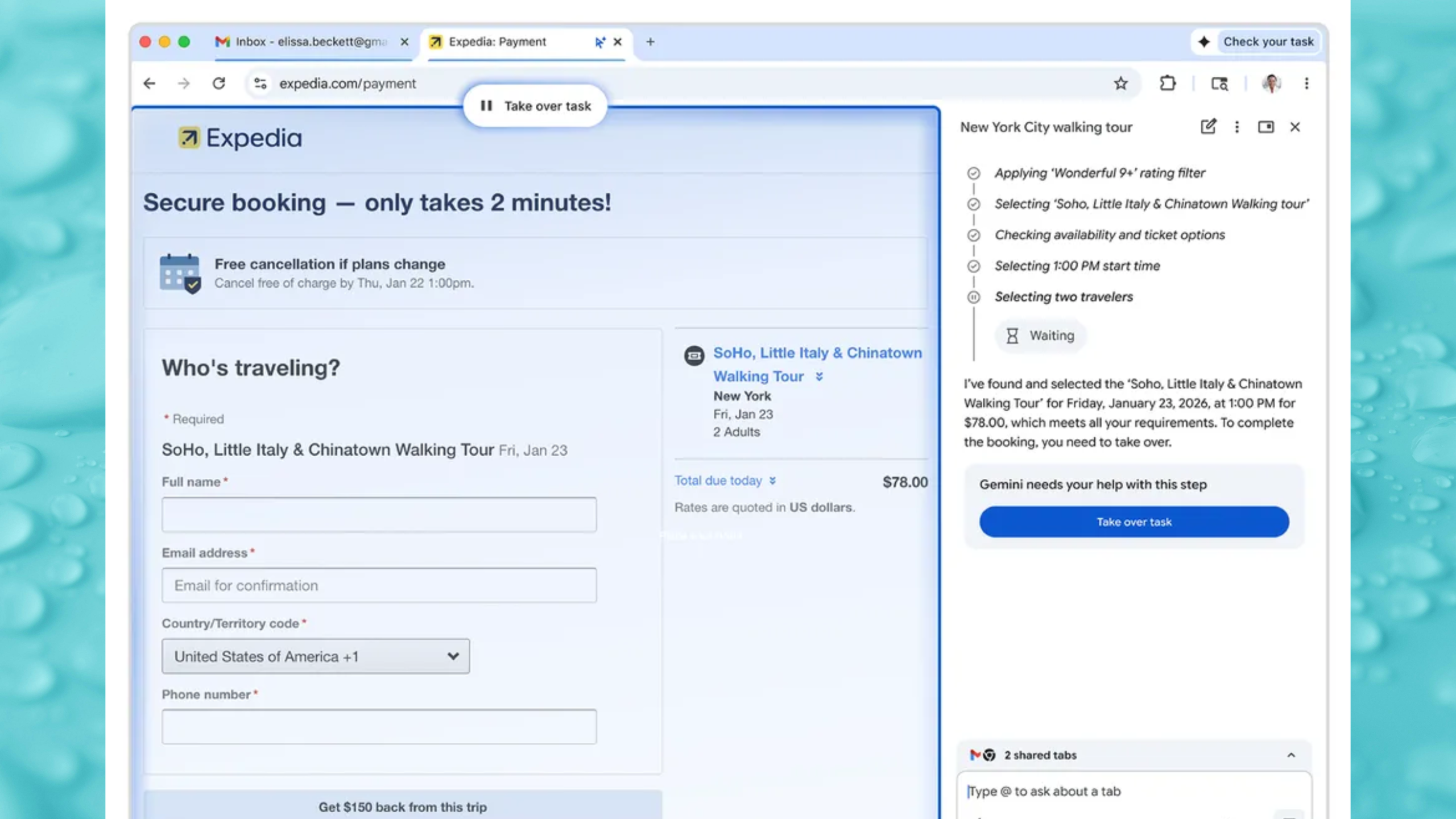
The introduction of this experience comes with a series of new features, but the most intriguing is “Auto Browse”, an agent-type tool powered by Gemini 3, which can automate complicated tasks on the web, from planning a vacation to managing online forms.
What is “Auto Browse” and why does it matter?
“Auto Browse” represents a significant evolution from simple autofill functions that we know from browsers. Instead of just automatically filling in a few fields, this feature can execute complex actions autonomously, after the user gives initial instructions. For example, if you are planning a trip, the feature can compare prices for hotels and flights, find convenient options based on budget and dates, and even manage bookings all through a single automated workflow.
Essentially, instead of spending hours researching multiple websites, opening tabs, and comparing offers, the browser can do this effort for you. Auto Browse can also be used for filling out tedious forms, scheduling meetings, managing subscriptions or tax documents, and much more.
Gemini 3 – a permanent AI assistant
Another major change is the integration of Gemini directly into a side panel in Chrome, permanently available while you browse. This panel makes Gemini always accessible, without losing the context of the current page, and allows for efficient multitasking. You can compare products from various websites, synthesize reviews, or generate short action lists without closing or switching between tabs.
This approach conceptually changes the way users interact with the browser: it is no longer just a tool for viewing web pages, but becomes an active partner in web navigation and productivity.
Nano Banana: Editing and generating images directly in the browser
In addition to Auto Browse, Chrome also benefits from the direct integration of Nano Banana, an AI image generation and editing tool. There’s no longer a need to download or reload images in external applications; you can transform images in real-time using simple text commands. This functionality can be used for creative projects, quick visual content modifications, or even for creating custom graphics for blogs, social media, or presentations.
Connecting with Google applications for integrated workflows
The Chrome update also brings deeper integration with Google applications such as Gmail, Calendar, Maps, YouTube, Google Shopping, and Google Flights. Thus, Gemini can not only access relevant information from these applications but can also create smart workflows, for example, it can find a detail in an email, suggest a convenient flight, and then draft a message for colleagues about your plans.
This connectivity transforms the browser into a central hub for organization, planning, and digital communication.
Control and security: you decide when and what is executed
Although Auto Browse can automate many tasks, Google designed this functionality to keep control in the hands of the user. When it comes to actions with potential risk, such as making a purchase or posting on social media, the AI will request explicit confirmation before proceeding.
This addresses a legitimate concern regarding digital security and personal data protection, ensuring that the user does not lose control over important decisions.
Where is Gemini 3 “Auto Browse” available and what’s next?
Currently, “Auto Browse” is launched in preview in the United States, being available for subscribers of the Google AI Pro and AI Ultra plans on desktop (Windows, MacOS, Chromebook Plus). Google intends to expand this functionality to other regions and devices as the technology is optimized and tested more broadly.
The Chrome update based on Gemini 3 marks a significant change in the evolution of web browsers. From a simple tool for accessing pages to an AI assistant that can take over repetitive and complex tasks, browsing the internet becomes more productive, faster, and more integrated with the user’s digital ecosystem.
Source of the article: https://blog.google